
When users buy a new smartphone, they move all their contacts, videos, apps, games, pictures and important documents to their new device. Whether its Android, Nokia or IOS phone or tablet, transfer of data is probably incomplete without saving it to computer’s hard disk.
Motorola’s latest Migrate app takes your PC or laptop out of the picture. It uses Bluetooth technology to transfer files and other important data wirelessly between 2 devices. The file moving procedure is simple. You just have to follow the instructions that appears on your screen. But before this happens, you’ll have to download Motorola migrate to storage of your mobile device and you should install it.
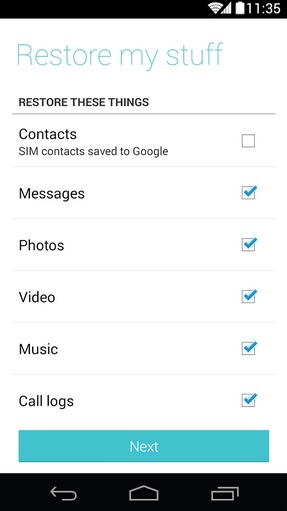
When you run this software, it will display a drop down list of compatible OS and a next button. You have to select the source OS. After doing this, tap on the button. Now migrate will suggest you the following file types to transfer
- Messages.
- Photos.
- Music.
- Videos.
- Contacts.
- call logs.
You just have to tick on files that you want in your new handset. When you do this, hit next button, choose target OS and wait for transfer operation to complete.
Motorola Migrate is a free to use app. Its download size is 4.9 mgebaytes. It lets you move files to iCloud from your phone and vice versa. This software has been designed to work on Android froyo (v2.2) and higher operating systems. It comes preinstalled on Droid, Moto G and X series phones. As the company has updated the features of this app, you should reinstall it on your phone.