
Share This

Karbonn A6 smartphone was launched way back in march this year. Ever-since launched, this device has seen huge sales in India and is being still sold in a bulk. This White/Black colored mobile comes with specifications that can be considered good for a price tag of 4900 Rs.
Full full specifications and features:- A6 features an IPS LCD capacitive touchscreen display that sports a 480 x 800 pixel screen resolution. It weighs just 114 grams and has 5.0.4 inch height, 2.59 inch width and a 0.46 inch thickness. A dual Sim smartphone, A6 features decent memory specifications of 512 MB RAM and a 104 MB storage.This smartphone supports data storage expansion through a 32 GB microSD card.A6 specifications also includes an Android ice cream sandwich OS and a single core 1000 MHz processor.
A6 smartphone comes with 2G, EDGE networkconnectivity and lacks 3G, GPS. It comes with a 1450 mAh lithium ION battery which gives the phone a total 250 hours of standby time and a 3.5 hours of talk-time. This budget smartphone comes preloaded with some very interesting and enjoyable games, This phone also comes with accelerometer sensor and a 5 megapixel rear camera, a VGA front camera. Other features of this phone includes a 3.5 mm audio jack, bluetooth, wifi, load-speaker, support for java apps.
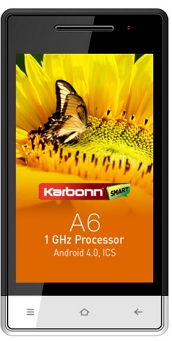
Price in India:- 4000 - 5000 Rs
Karbonn A6 hard reset procedure:-
If you’re facing any problems with this phone then you can hard-reset it.The procedure for is simple and can be accomplished with the below steps -
- Turn off your mobile phone and press home, center and power button at the same time.
- After few seconds, you’ll see a triangle symbol on your display.
- Now press the call button .
- Now press the volume button and select wipe data factory option or the factory reset option. Once done, press the center button to hard reset your phone.

I have a Karbonn A6 phone it was locked. It’s asking for gmail user/pass but he doesn’t have it. I tried to boot into recovery mode using Power+Volume Up button but all I get is a white triangle with an exclamation mark in it. I can’t seem to go beyond that. USB debugging was perhaps not enabled unless it was enabled by default. There is no camera button, only power and Volume Up/Down. What do I do?
I just need to get this phone working somehow. Any help would be really appreciated. Is there a way to use a computer and a USB cable to get it running? Please do help.
who’s the call button in karbonn A6