
WordPress is one of the most widely used blogging platform. It offers a lot of free plugins and responsive themes. Thus you can launch any type of website. If you’re an user of this free CMS and if you want to improve its performance, please follow the tips i’ve shared through this post.
Install and configure W3TC (WordPress total cache plugin)
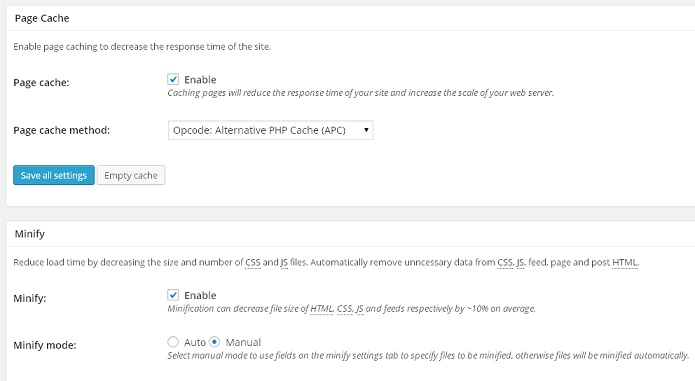
When you install and setup a powerful caching plugin like W3TC, your website load time will decrease considerably. Configuration of W3TC is an easy task that can be accomplished by following below steps:
Open the general settigs page of WRTC. Now Enable page caching with alternative PHP cache method. Scroll down and enable manual Minification and browser cache. Open minify tab from W3TC panel and click on the help wizard. Now you’ll see a large dialog box with 2 separate sections for JavaScript and CSS files. Select the files that you want to minify and hit apply + close button. If you want to further speed up wordpress site on Godaddy or hostgator, open the browser cache dashboard and increase the expiry headers lifetime to 7 days. Don’t forget to save the settings.
Deactivate unwanted plugins
To do this, run P3 Plugin profiler test on your WordPress site. If you find plugins that consume too much of CPU cycles or RAM, you should disable it immediately and install its lightweight alternative.
Compress JPEG and PNG images
Many people use GPRS or 3G connection to browse the internet. If a visitor is accessing your site on his mobile device, your WordPress site will load faster if you use small-sized images. To do this, you should install EWWW Image Optimizer or WP Smush it plugin on your site. These 2 plugins removes unnecessary bytes from images. Thus compressing them.
Use Content Delivery Network
If your WordPress site is generating a decent income, you should start using CDN. If you do this, images and other static resources like CSS and JavaScript files will be sent from CDN server located at the same region of the visitors. Thus improving your website’s speed.
The above 5 tips are enough to speed up WordPress website hosted on GoDaddy, Bluehost and Hostgator servers. So make sure than you follow them.