Guys, today while i was working the quality of a small film i shot with my Samsung mobile phone, i encountered a situation where i had to edit the film. I wanted to convert the film from full HD quality to 720p so that i can create a DVD out of it.I knew that this task can be easily accomplished with the procedure of video cropping. Hence, i searched on the internet to find a tool that will help me to accomplish this task. After doing a bit research i ended up downloading Movavi. I immediately installed the software on my PC. The features of this software are impressive and very easy to use. The video cropper of movavi software is the one of the most impressive features of this tool and it helped me to crop the video file easily. Movavi was established way back in the year 2004. Hence, the company has the necessary experience to build a great quality software. The experience reflects in their video editing software. As i am very much impressed impressive with this editing tool, i’ve decided to write down a tutorial on How to crop video files easily. This tutorial will be useful for users who want help from the same topic. So lets keep the ball rolling -
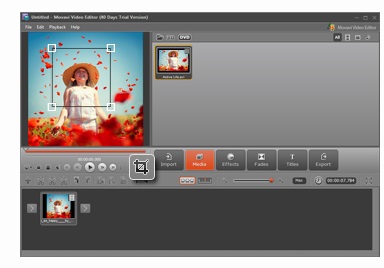
Step # 1: Download and install the movavi editing application on your computer.
Step # 2 : Choose the story board mode. Now , from this application’s memo, choose the add media files option. If you do this a file dialog box will appear. Through that dialog browse the directory where you’ve stored the video to be cropped.
Step # 3 : Now comes the real fun part, from this application’s preview area, choose crop option. Now, you’ll be able to see a rectangle floating over the video. Stretch it as per your retirements.
Step # 4 :- Click on the Save movie button and select the file format in which you’d like to save the video that you’ve cropped.
Step # 5 : Editing task is now complete. Done !
