Hibernation in windows saves the content of main memory in file named hiberfil (with .sys extension) and turns off electric supply to the some hardware components of your computer. When the PC is out of this mode, the system loads the saved data back into the RAM. This ensures that the user resumes his work from the point where he had stopped. The size of this file is same as capacity of your system memory and it can’t be deleted manually. It is located in the root folder of the drive where the OS has been installed. If you want to enable hibernation, configure the power options in the control panel of your computer. Although this is an useful feature introduced in Windows 7, 8 or 8.1 OS, when the system shows low hard drive or SSD storage capacity warning then you have to delete hiberfil.sys to free up disk space. This can be done in two different ways:
Method 1:
- Open the run utility, type powercfg.cpl and press OK.
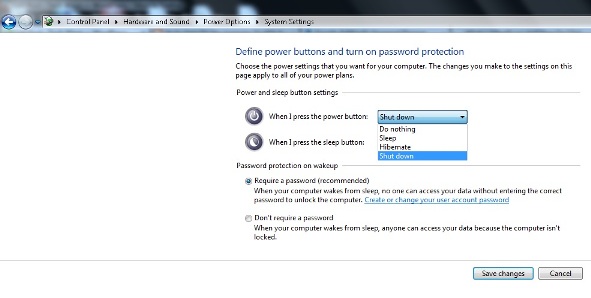
- Click on choose what power buttons do link.
- If hibernation is selected in the drop down list deselect it by choosing a different option.
- Now save the settings.
- Done.
Method 2:
- Type cmd in Windows run tool and hit Ok.
- Copy paste powercfg.exe /hibernate off text in the command prompt.
- Press enter on your keyboard.
- Done.
Both the above methods will remove the file from your system. To further free up disk space and improve its performance, follow the below steps:
- Right click on any partition in computer.
- Go to its properties and select disk cleanup.
- Check all the options and hit Ok.
- Perform the above 3 steps for all the partitions.
- Done.
Once you perform all the above steps, defragment all Windows partitions and reboot your computer. Now you’ll experience significant improvement in its performance.
