WordPress website with commenting enabled for the visitors are prone to spam comments. One such website is techwayz. My website was targeted by many spammers before i started using a couple of free plugins that completely eliminated spam. Before using those 2 plugins, i had commentluv and gasp installed on techwayz. Gasp has been coded to prevent spambots that target WordPress websites. It works well for most of the websites but not for me. I used GASP with Akismet as well but the spam detection was not 100% accurate as some genuine reply to posts were sent to the spambox.
0 Spam comments without a Premium/Paid WordPress plugin
As this website gets a lot of spam and a few genuine reply’s on posts each day, it was frustrating for me to check each and every comment in the spambox. Commentluv premium comes with a better spam protection and features like reply me, click tracking. But this plugin is not free. You’ll have to pay 97$ to have this plugin installed on your website. To find an alternative to commentluv premium, i tried several WordPress commenting system which includes livefyre, Disqus and some free captcha plugins. Plugin’s like Disquss and Livefyre affected the page load time of techwayz and the captcha plugins were useless. After a lot of bad experience with several plugins, i tried the jetpack commenting system. Guess what? The jetpack commenting system worked for me. I installed jetpack along with Akismet. Both these plugins work great together. Ever-since i have installed these two plugins (that i was talking about in 2nd line), my website hardly get any spam. Only genuine reply’s are filtered and showed in the comments pending dashboard. Jetpack’s commenting system also comes with 2 must have features on every WordPress websites
- notify me of follow up comments.
- notify me of the new posts via email.
Well, if you’re looking for a best WordPress commenting system that filers genuine reply’s and discards spam then jetpack commenting system is the best available option for you. This plugin is free to download.
Download Jetpack through this link.
Download Akismet through this link.
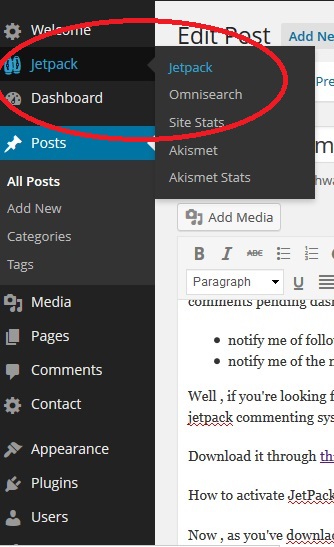
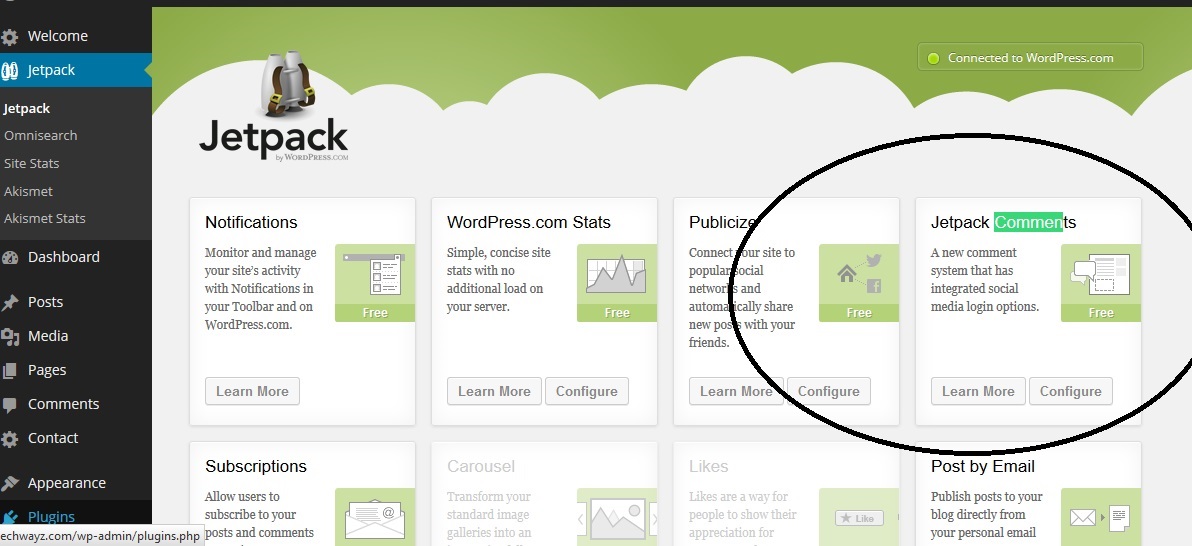
How to activate JetPack commenting system on a blog/website?
Now, as you’ve downloaded and installed the jetpack, you may be wondering how to enabled the plugin’s commenting system? well, the answer to this question is easy. Have a look at the below screen shots to get the answer.