When you move from blogger to WordPress , you may want to transfer images too (transfer images from blogger to WordPress) . Transferring images from blogger to WordPress isn’t difficult as it seems . You don’t have to download each and every image from your old blogspot account to your hard-drive and upload them your WordPress WP-content directory one by one . Nor you have to hire a professional blogger to WordPress migration service to do this . Yes , this is true . WordPress is a versatile platform . There are many plugins available for accomplishing any of your tasks .To accomplish the task of migrating images from blogger to WordPress with an ease , you’ll have to use the cache images plugin from the WordPress plugins directory .Using the cache images plugin is not a rocket science . This plugin comes with an Ajax based interface which transfers remote/external images from an external link to your WP-content directory on the fly.If you run a multi author blog then this plugin can be very useful as the author may link your post to some external image resource .
Must Read :- Top 20 Best Responsive Blogger templates for free download
Transfer images from blogger/other resources to WordPress
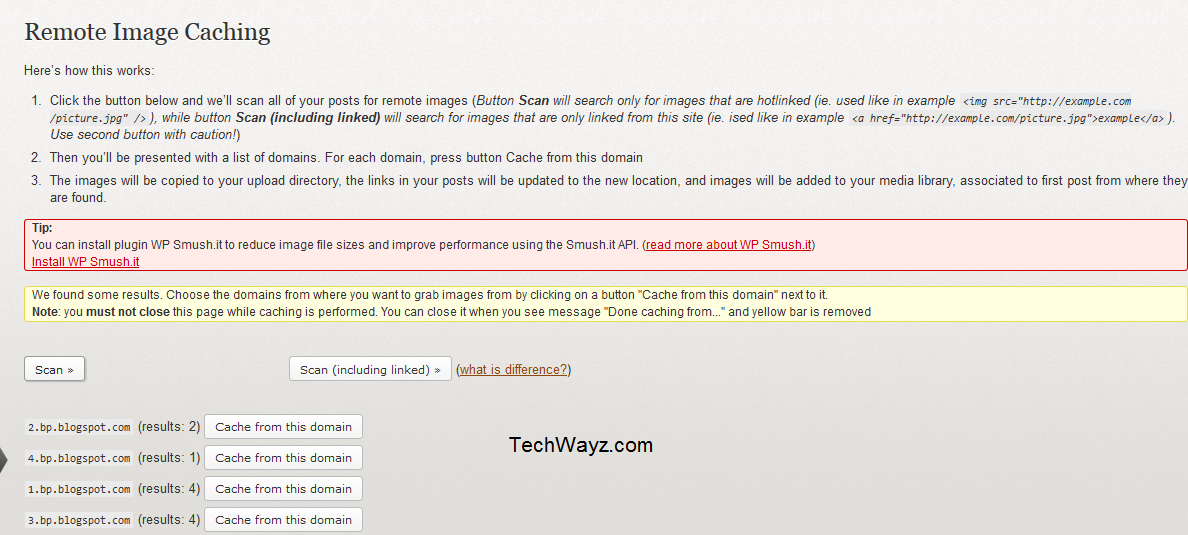
This plugins working logic is simply awesome. Cache images plugin scans all your blog posts for external images (external images link) and transfers all of them to your WordPress images directory in a few minutes/seconds.With this plugin installed on your WP blog , all you have to do is search for all external images link by clicking on the scan button . (Goto Tools -> Cache Remote Images ) Now , if this plugin discovers external image files linked to your posts , you’ll be able to see the details of the domain that has the images (like blogspot ). In the front of the details , there’s a button labelled cache from this domain . Click on it an relax while the transfer image from blogger to WordPress task has been completed.Repeat this procedure until all your images have been transferred .Now as you’ve seen the uses and the features of cache-images plugin , you may wanna use it on your WP blog . Download it from the below link .
Download cache images plugin .