Thanks to the tremendous efforts of scientists and engineers who invented the Internet that has changed our lives. We are able to book tickets, Get the latest news, download free eBooks, recharge mobiles and direct to home services, pay bills online within a few seconds just because of Internet. Accessing Internet requires you to subscribe to either the best GPRS plans or get a higher internet speed 3G/4G data card (which ever is suitable to your budget). All the network operators around the world promises good network connectivity but you can’t completely trust their service unless you use it.If you’ll search on the internet, you’ll find thousands of discussion forums flooded with bad reviews on internet speeds of the top mobile operators. If you’re one such customer having bad reviews of internet speed from your mobile operator, just try the below mentioned tricks to improve your internet speed. . If this doesn’t work then you have got no other option than replacing it with some better internet connection.
How to increase internet speed on Windows PC ?
If you’re facing internet speed problem on your windows PC, just follow the below tips. You’ll experience an improvement
- Browse without images:- Yes, this can help you to boost your internet speeds. Web sites have images that need to be transported at the client locations on request by the client (browser). If the image is large, it may take some time (depending upon the type of internet connection you’re using) to reach at your end to be displayed by your browser. Many browsers come with an option to help you browse the internet without images. All you have to do is check the disable images check-box. Or install the Image Block add-on on Firefox or the Blocker extension in Google Chrome and activate it. Browsing without images is the best method to improve the internet speed if you’re facing internet speed problems with your existing operator/service.
- Disable QOS Service :- To make sure that windows use full 100% bandwidth of your internet connection, make sure that the Windows QOS service is disabled. .In windows XP, you can disable the QOS service by running services.msc -> right click on QOS service -> select disable and press apply button and restart the computer or on the windows 7, run gpedit.msc and navigate to the QOS packet scheduler tab as shown in the below screenshot
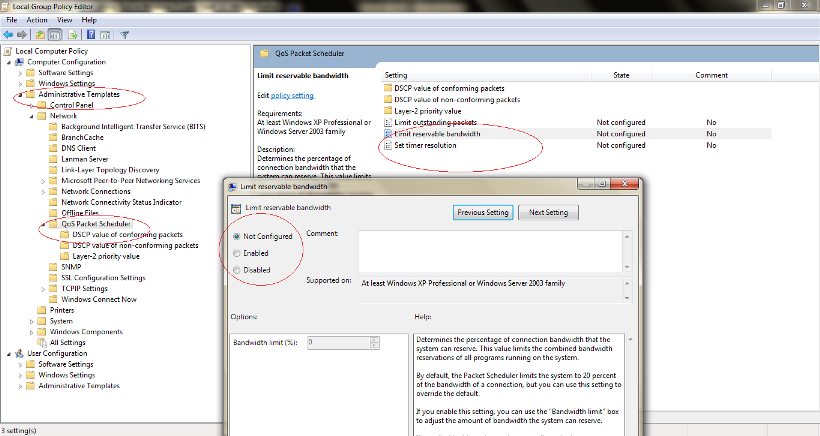
- Using HIGH performance fast DNS servers:- All you need to do is follow this awesome tutorial to locate DNS settings on Windows 7 or this tutorial for Windows XP and change the preferred DNS server to 8.8.8.8 and alternative DNS server to 8.8.4.4
How to increase internet speed on mobile phones ?
If you want to improve the internet speed on your browser, the either download and install the fastest browser for smartphones or as explained above, browse the internet by disabling images.
I hope you’ve found an answer to the question of How to increase internet speed on Windows PC and mobiles?

Hi Pramod,
I wasn’t aware that we can browse websites without browsing images, it’s totally new to me. However I use fast internet connection from Airtel but yes certainly it’s a useful point to remember if your internet speed is slow.